Know what every agent, every customer, every call costs
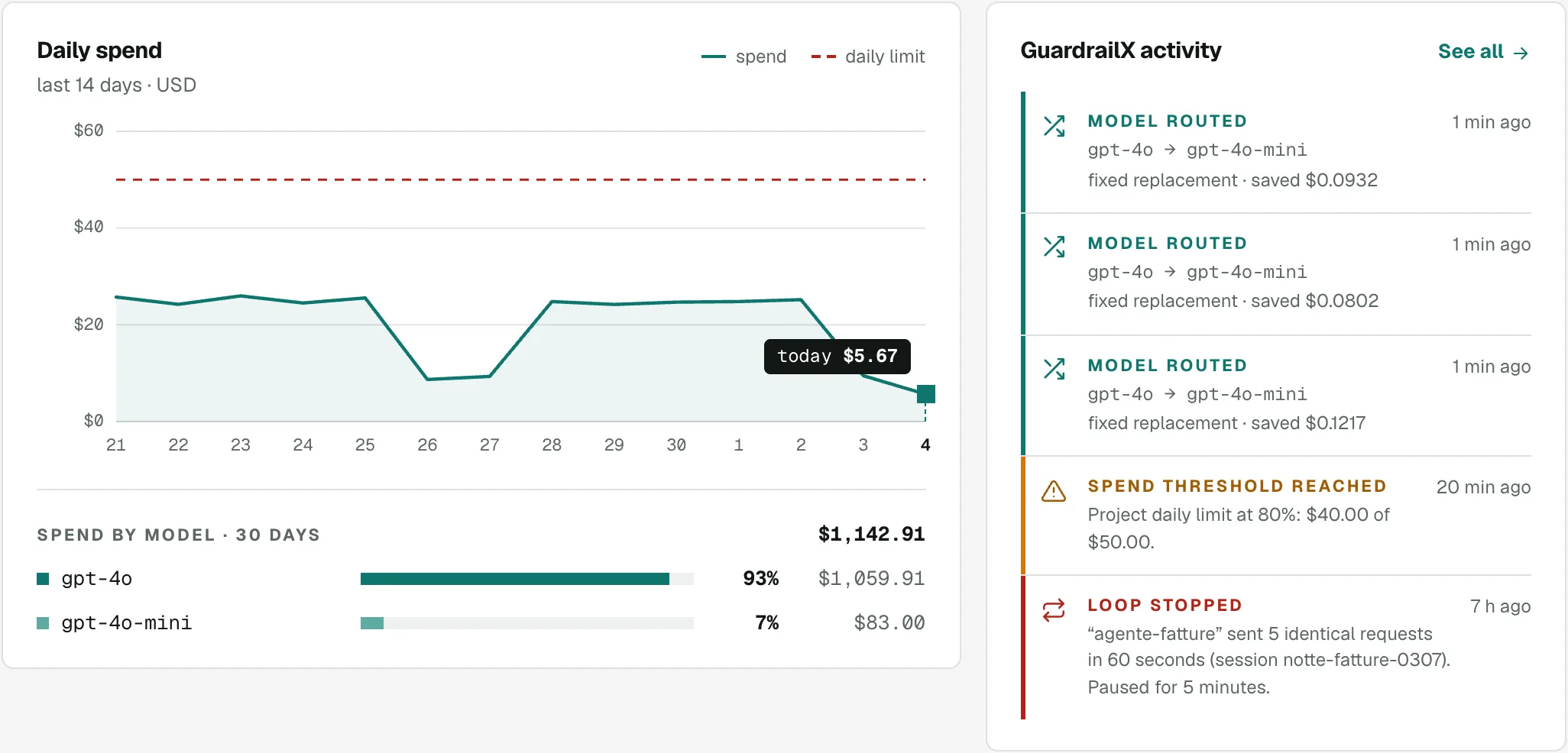
GuardrailX records the cost of every call with the providers’ price lists: model, tokens, agent, customer and session. You see it day by day in the Overview, call by call in the Requests log, and you export it to CSV.
Free plan forever: 5,000 requests a month, no credit card.
The provider sends you a total. You need the details.
A monthly invoice doesn’t say which agent spends, for which customer, on which model. Without those numbers you don’t know what to optimise or how much to rebill.
A single number
The provider’s console shows spend per key or per model. Agents and their runs aren’t there.
What does each customer cost?
If agents work for several customers, each one’s spend gets lost in the total.
Rebilling by hand
Spreadsheets and estimates to pass AI costs on to customers, every month.
How it works
Every call goes through GuardrailX, which records its cost, tokens and timing. With a few extra headers you say who it belongs to.
-
1
It records every call
Cost computed on the providers’ price lists, tokens (reasoning tokens too), model asked for and used, timing, retries and outcome.
-
2
You say whose spend it is
With the X-GuardrailX-Agent, -Customer, -Session, -Step, -Feature and -User headers every call has its agent, customer, run and function.
-
3
A day-by-day overview
Each day’s spend against your limit, per model, agent, customer and month, and everything GuardrailX did: thresholds, routing, loops stopped.
-
4
A log with filters and export
Every call with its details, filters by agent, customer, session, model and outcome, a per-session view and CSV export.
-
5
Alerts and webhooks
Email, webhook (Slack, Discord) or Telegram when a limit is close, exceeded or a loop is blocked.
The attribution headers
All optional: without them you still see spend per key and per model. Each one adds a way to look at costs.
- Values with accents or symbols are sent encoded (encodeURIComponent): GuardrailX decodes them.
- GuardrailX removes them before forwarding the call to the provider.
- The Overview warns you if few calls carry an agent or a session, the two that unlock the most.
// Node: who each call belongs to
const client = new OpenAI({
  baseURL: 'https://agent.guardrailx.ai/openai/v1',
  apiKey: process.env.GUARDRAILX_KEY,
  defaultHeaders: {
    'X-GuardrailX-Agent': 'agente-fatture',
    'X-GuardrailX-Customer': cliente.id,
    'X-GuardrailX-Session': lavoro.id,
    'X-GuardrailX-Feature': 'estrazione',
    'X-GuardrailX-User': utente.id
  }
});
What each header unlocks
The header name and what you see on top when calls send it.
| Header | What it unlocks |
|---|---|
| X‑GuardrailX‑Agent | Spend and limits per agent, Autopilot and suggestions per agent |
| X‑GuardrailX‑Customer | Spend per customer and CSV to rebill; with Agency, margin, limits and reports per customer |
| X‑GuardrailX‑Session | Limit per run, anti-loop that stops only that run, comparisons per session |
| X‑GuardrailX‑Step | Redone pages stopped, missing pages per file |
| X‑GuardrailX‑Feature | Autopilot split by function, uniqueness rules per function |
| X‑GuardrailX‑User | Who uses the chatbot, in Requests and in the CSV |
For teams running agents for customers
Spend per customer is in every plan. With the Agency plan it becomes part of your P&L.
- Enter what you bill each customer and see the month’s margin in euro, at the day’s ECB rate, with an alert if it drops below your threshold.
- Spending limits and pause per customer: if one customer goes overboard you stop just them, the others keep going.
- A monthly report per customer with costs, calls, agents and models, with your agency’s name and logo.
| Feature | Which plans |
|---|---|
| Spend per customer · Overview, Requests filter and CSV | Every plan |
| Limits and pause per customer · Customers tab | Agency |
| Margin and reports · in euro, with your logo | Agency |
Questions about cost tracking
Do you store the text of my prompts?
No. The Requests log shows which calls, from which agent and model, when, what they cost and with what outcome; the text of prompts and responses stays in your agent’s logs.
How do you compute a call’s cost?
From the tokens the provider reports in the response, with that model’s price list: input, output (reasoning included) and tokens read from or written to the cache each have their price. Costs are in dollars, like the providers’ prices.
Do I have to send every header?
No, they are all optional. Without them you see spend per key and per model. Agent and session are the two that unlock the most: the Overview warns you when they are missing.
How long are calls kept?
Request history is 90 days with Free and Base and 365 days with Agency.
Can I export the data?
Yes, to CSV from the Requests log, with filters and in the per-session view too: it’s the file to start from to rebill customers.
Can I see costs in euro?
In the Agency plan’s Customers tab, costs and margin are in euro, at the ECB rate of each call’s day. Limits and the log stay in dollars, like the providers’ price lists.
Related features
Spend limits at every level
Per project, key, agent and session, daily and monthly. Once the limit is reached, the call stops before it costs anything.
Autopilot
Tries cheaper models on your calls by itself, measures quality and moves traffic a little at a time, rolling back if needed.
Environmental impact
Energy, CO₂e and water saved by stopped loops and lighter models, estimated from tokens, with CSV export for ESG reports.
Put a cap on spending before the next loop.
Start on the Free plan: 5,000 requests a month, no card and no end date.