Cap your AI agents’ spending before it starts
Daily and monthly limits per project, key, agent, customer and session. Once a limit is reached, GuardrailX stops the call before the provider, so it costs nothing, and alerts you.
Free plan forever: 5,000 requests a month, no credit card.
The invoice comes later. The spending doesn’t.
The provider gives you a total and one limit for the whole account. But agents work on their own, at any hour and for different customers.
Spending at night
Scheduled jobs run while nobody is watching. You find out in the morning, from the provider’s dashboard.
One limit for the whole account
The provider’s cap applies to everyone: one agent going overboard eats the budget of the others, and of your customers.
Who spent it?
Which agent, which customer, which session? The provider sends a single number.
How it works
Every call goes through GuardrailX, which counts the real spend with the providers’ price lists and checks the limits before forwarding it.
-
1
You set the caps
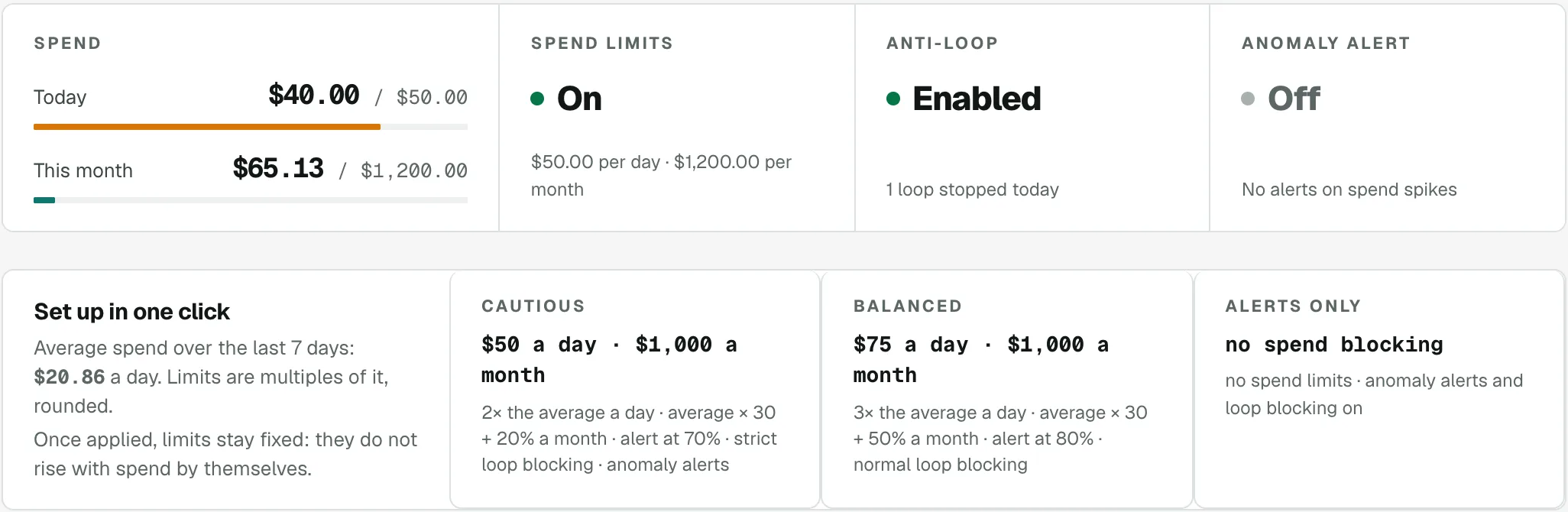
Daily and monthly per project, key, agent and customer, plus a cap per session. Or start from a preset (Cautious, Balanced, Alerts only) computed from the spend of the last 7 days.
-
2
It reserves the cost before forwarding
To avoid overshooting with calls in flight, it reserves the estimated cost before forwarding, with the whole max_tokens requested, and replaces it with the real cost when the response ends.
-
3
It stops the call at the limit
Once the limit is reached, the call gets a 429 in the provider’s format with the reason (for example agent_daily_limit) and never reaches the provider.
-
4
It alerts you before and after
An alert when spend reaches the threshold you choose (80% by default) and one when a call is stopped: by email, webhook (Slack, Discord) or Telegram.
-
5
It notices spikes
Every 5 minutes it compares each agent’s spend in the last hour with its average over the 7 days before. If it’s far above, it alerts you, with a link to pause the agent or the project.
What your code receives
A 429 error in the provider’s format (OpenAI, Anthropic or Gemini), which official SDKs read like any other error.
- The reason in the x-guardrailx-blocco header and in the error code: project_daily_limit, key_monthly_limit, agent_daily_limit, customer_monthly_limit, session_limit…
- x-should-retry: false: the OpenAI and Anthropic SDKs don’t retry on their own a call that can’t go through.
- For limits per agent, customer and session, the X‑GuardrailX‑Agent, ‑Customer and ‑Session headers are all you need.
# The answer when an agent goes over its daily limit
HTTP/1.1 429 Too Many Requests
x-should-retry: false
x-guardrailx-blocco: agent_daily_limit

{
  "error": {
    "type": "guardrail_error",
    "code": "agent_daily_limit",
    "message": "GuardrailX: reached the daily limit of agent “agente-fatture” (spent $20.03 of $20.00). Calls blocked until tomorrow."
  }
}
// Node: the headers for limits per agent, customer and session
const client = new OpenAI({
  baseURL: 'https://agent.guardrailx.ai/openai/v1',
  apiKey: process.env.GUARDRAILX_KEY,
  defaultHeaders: {
    'X-GuardrailX-Agent': 'agente-fatture',
    'X-GuardrailX-Customer': cliente.id,
    'X-GuardrailX-Session': lavoro.id
  }
});
A cap at every level
Daily and monthly, with a single cap per session. The tightest limit always wins; an empty field means no limit.
| Level | Applies to |
|---|---|
| Project | Every call of the project |
| gr_ key | Calls made with that key |
| Agent | Calls with X‑GuardrailX‑Agent |
| Customer (Agency plan) | Calls with X‑GuardrailX‑Customer |
| Session | Each value of X‑GuardrailX‑Session, that is each run |
Only the models you chose
A spending limit helps little if an agent ends up on a very expensive model by mistake. With allowed models you decide which models the project’s agents can use.
- Pick the models from the list, from different providers too, and turn on «Only allow the models in the list».
- The final model is checked, after the routing rules; dated versions count as their model.
- It applies to every call that names a model, embeddings and transcriptions too.
| If an agent asks for a model that isn’t allowed | What it costs |
|---|---|
| Block the call · 429 model_not_allowed | Nothing: the call never starts. |
| Use the provider’s default model · the response carries x‑guardrailx‑modello‑originale | The cost of the default model; Requests shows «asked … → used …». |
Questions about spending limits
What happens when an agent goes over the limit?
The call stops before it starts, so it costs nothing. The agent gets a 429 in the provider’s format, with the reason in the x-guardrailx-blocco header (for example agent_daily_limit) and x-should-retry: false, and you get an alert.
If I have several limits, which one applies?
The tightest. An empty field means no limit. Agent and customer spend is always counted, even without a limit, so a limit set mid-month starts from the real spend.
Can calls in flight go over the limit?
Before forwarding, GuardrailX reserves the call’s estimated cost with the whole max_tokens requested (without it, the model’s maximum) and replaces it with the real cost when the response ends. With very high values, fewer calls go through together near the limit. With a spending limit, a call whose model it can’t recognize doesn’t start (model_not_recognized).
When do I get an alert?
When spend reaches the threshold you choose (80% of the limit by default) and when a call is stopped. Each alert is sent once, by email, webhook (Slack, Discord or your own URL receiving JSON) and Telegram, if connected.
How does the anomaly alert work?
Every 5 minutes it compares each agent’s spend in the last hour with its hourly average over the 7 days before. If it’s above the factor you choose (for example 5 times), you get an alert with a button to pause. The minimum spend avoids alerts over a few cents.
Can I stop everything right away?
Yes. The project pause stops every call (project_paused) until you resume; an agent’s pause stops only its calls (agent_paused). Alerts include a signed link to pause without opening the dashboard.
Why aren’t the provider’s limits enough?
They apply to the whole account, not per agent, customer or session, and often kick in when the money is already spent. GuardrailX checks every call before forwarding it, at the level you choose.
Related features
Loop blocking
Spots the same request repeated within seconds and blocks it, with a clear error your code can handle.
Model routing
Rules per model and per agent: send work that doesn’t need the most expensive model to a cheaper one, with automatic fallback.
A log of every call
Cost, tokens (reasoning tokens too), model, agent, session, retries. Filters, charts and CSV export.
Put a cap on spending before the next loop.
Start on the Free plan: 5,000 requests a month, no card and no end date.