Your clients’ AI agents, with your margin under control
If you build agents for several clients, GuardrailX tells you what each one costs, what you bill them and the margin you keep, in euro. Cap whoever goes overboard and, at the end of the month, send each client their report with your logo.
Free plan forever: 5,000 requests a month, no credit card.
The AI costs are yours. The clients are many.
You pay the provider, with a single key, and the invoice arrives at the end of the month. How much each client spent, and whether your price still covers it, you find out later.
Margin shows up at month end
A client using much more than expected eats the fee, and you notice when the provider’s invoice arrives.
One client weighs on all
With a shared key, an agent going overboard for one client uses up everyone else’s budget.
Reports made by hand
Spreadsheets, exports and dollar-to-euro conversions to explain to each client what they used.
How it works
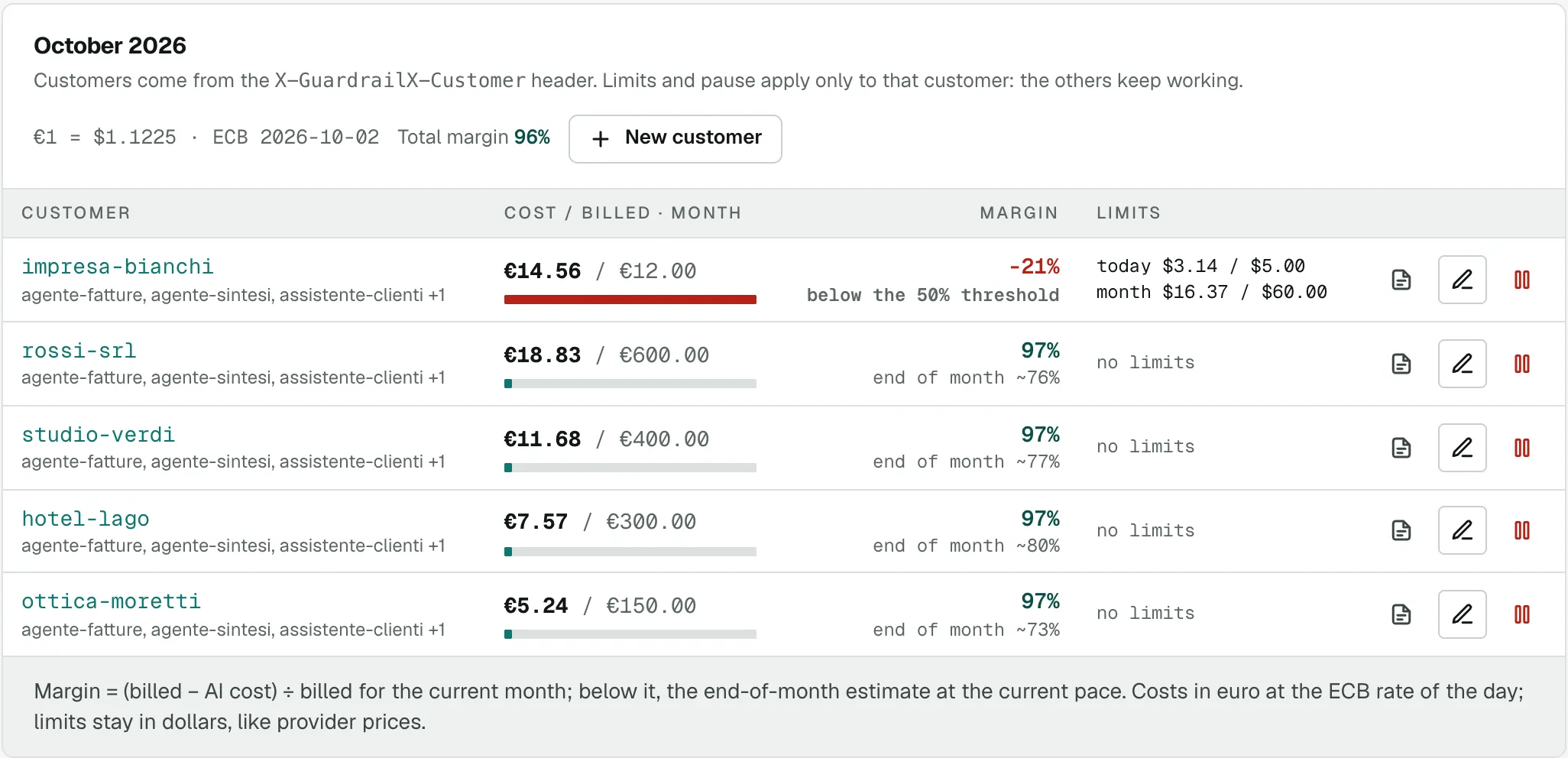
Every call says which client it’s for. From there GuardrailX computes each one’s spend, billing and margin, and alerts you when something is off.
-
1
You say whose call it is
With the X-GuardrailX-Customer header, or by assigning a whole project to a client. Spend per client is in every plan.
-
2
You set how you bill them
A price list per client: fixed fee, markup on AI cost, or a fee with part of the cost included and the markup beyond.
-
3
You see the margin in euro
The month’s AI cost, billing and margin at the ECB rate of each call’s day, with a month-end estimate and an alert if it drops below your threshold.
-
4
You stop only whoever goes overboard
Daily and monthly spending limits and pause per client: if one goes over the cap, only they stop, the others keep going.
-
5
You send the client the report
A monthly report per client with costs, calls, agents and models, with your agency’s name and logo: print it or save it as PDF.
One header per client
Your code sends the client’s id in X-GuardrailX-Customer. GuardrailX removes it before forwarding the call to the provider.
- The id is whatever you already use in your system: a code, a slug, a number.
- If a client has a project of their own, you can assign the whole project without sending the header.
- In Requests you filter calls by client and export them to CSV.
// Node: every call says which client it’s for
const client = new OpenAI({
  baseURL: 'https://agent.guardrailx.ai/openai/v1',
  apiKey: process.env.GUARDRAILX_KEY,
  defaultHeaders: { 'X-GuardrailX-Customer': cliente.id }
});
# The client «Rossi srl» mid-month
AI cost: €182.40
price list: €400 fee with €250 of AI cost included
to bill: €400
margin: 54% (threshold 30%)
How you bill each client
The price list belongs to the client, in euro. From it GuardrailX computes what to bill in the month and the margin.
| Price list | What’s billed |
|---|---|
| Fixed fee | The month’s fee, whatever the usage |
| Markup | The AI cost plus the percentage you choose |
| Fee with cost included | The fee covers part of the AI cost; beyond it, the extra cost with the markup |
| No price | You see the client’s cost, without billing or margin |
What’s in each plan
You see spend per client with any plan. Margin, price lists, limits per client and reports are in the Agency plan.
- You can invite a client into a project, read-only: they see that project’s numbers, so it’s best to give them a project of their own.
- Costs stay in dollars too, like the providers’ price lists; euros are at the ECB rate of each call’s day.
- Project, key and agent limits apply together with the client’s: the tightest wins.
| Feature | Plan |
|---|---|
| Spend per client · Overview, Requests filter, CSV | Every plan |
| Price list and margin in euro · with month-end estimate and threshold alert | Agency |
| Limits and pause per client · daily and monthly | Agency |
| Monthly report · with the agency’s name and logo | Agency |
| Clients invited into a project · read-only or with edit rights | Base and Agency |
Questions from agencies
Do I need the Agency plan?
Not to see each client’s spend: that’s in every plan, Free included. Price list, margin in euro, limits and pause per client and the monthly report are in the Agency plan.
One project per client or one project for all?
Either way. With a shared project every call sends the X-GuardrailX-Customer header. With a project per client you assign it whole, and it’s the right choice if you want to invite the client to see their numbers.
What currency are costs and margin in?
Price list, billing and margin are in euro. AI cost comes in dollars from the providers’ price lists and is converted at the ECB rate of each call’s day.
Does my client see anything?
Only if you invite them into a project, read-only or with edit rights. Otherwise you send them the monthly report, which you print or save as PDF.
How do I rebill the costs?
With the client’s price list, GuardrailX computes what to bill in the month. For the detail, Requests filtered by client exports to CSV.
Does the report carry my logo?
Yes: the monthly report carries your agency’s name and logo, which you set once in your account.
Related features
A log of every call
Cost, tokens (reasoning tokens too), model, agent, session, retries. Filters, charts and CSV export.
Spend limits at every level
Per project, key, agent and session, daily and monthly. Once the limit is reached, the call stops before it costs anything.
Autopilot
Tries cheaper models on your calls by itself, measures quality and moves traffic a little at a time, rolling back if needed.
Put a cap on spending before the next loop.
Start on the Free plan: 5,000 requests a month, no card and no end date.