The guardrail for cost, privacy and impact of your AI agents
Spend limits, loop blocking, sensitive data protected before the provider and an Autopilot that moves traffic to cheaper models by itself, only where quality stays the same. Change one line of code and always know what each agent costs.
Free plan forever: 5,000 requests a month, no credit card.
const openai = new OpenAI({
-  apiKey: process.env.OPENAI_KEY,
+  apiKey: process.env.GUARDRAIL_KEY,  // gr_…
+  baseURL: 'https://agent.guardrailx.ai/openai/v1'
});3 a.m.
One loop, one night, one invoice. And the same night with GuardrailX: real dashboard screens, sample data.
No sound: watch it anywhere.
An agent stuck in a loop doesn’t ask before spending.
Loops and retries
One logic bug and the agent sends the same request a hundred times. You find out from the invoice.
How loop detection works →Overnight spend
Agents work when nobody is watching. Provider console limits kick in late and apply to the whole account.
How spending limits work →No visibility
Which agent costs the most? Which client? Which model could be replaced? The provider gives you one total.
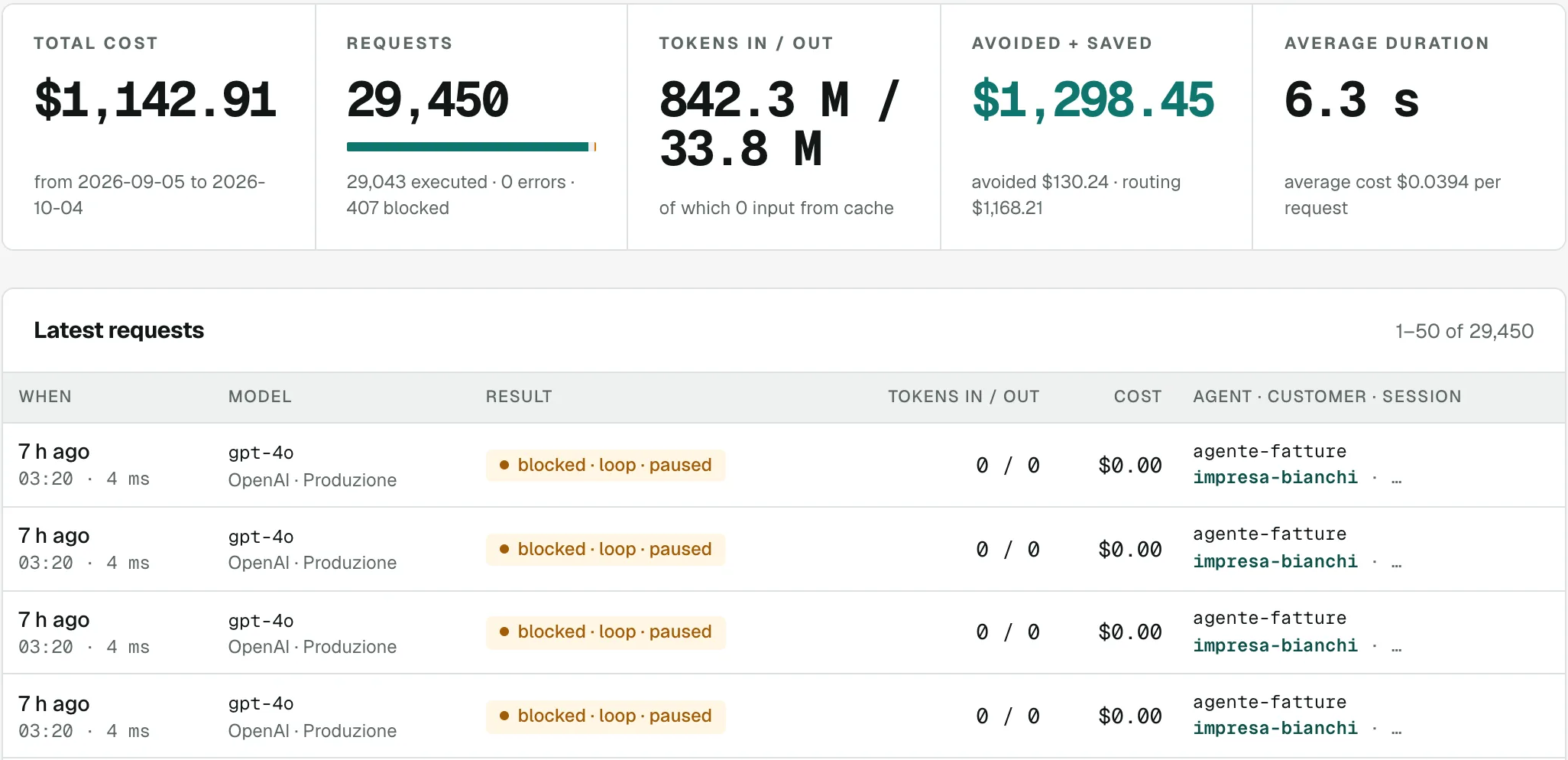
Last night at 03:20. “agente-fatture” (the invoice agent) started repeating the same request: GuardrailX stopped it and blocked the repeated calls while nobody was awake.
Up and running in five minutes
GuardrailX sits between your agents and the provider. Calls go through, costs are counted, limits apply before the money is spent.
-
1
Connect your provider
Add your OpenAI, Anthropic, Gemini, Mistral, DeepSeek or OpenRouter key. It stays yours, stored encrypted.
-
2
Create a gr_ key
One for each agent or client, with its own daily and monthly limits.
-
3
Change the base URL
Same SDK, same code. Only the base URL and the key change, in Node, Python or any HTTP client.
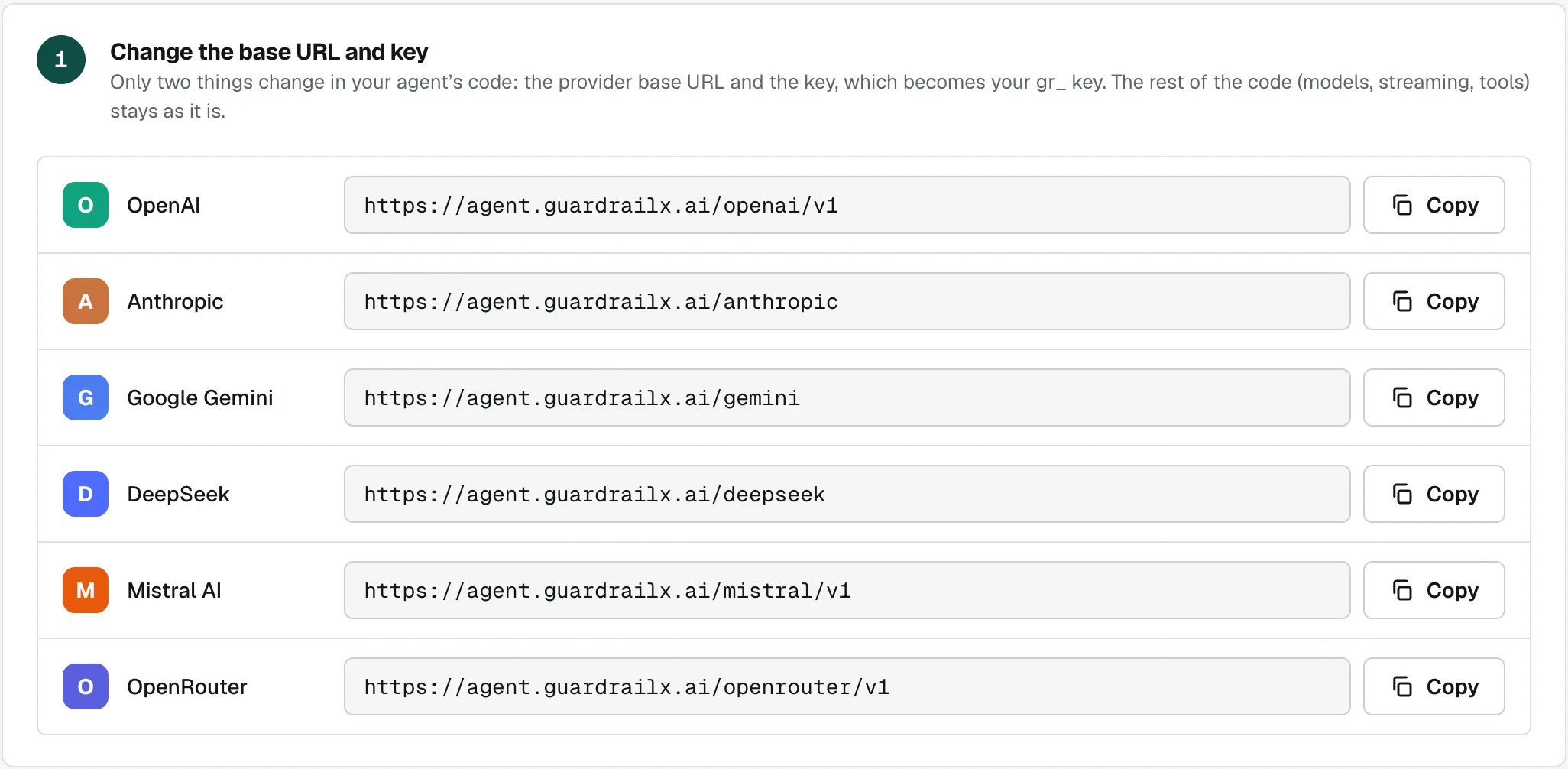
The Integration tab: one address per provider, to paste into your code in place of the original one.
It doesn’t just tell you what you spend. It cuts costs by itself.
Pick the minimum quality, the latency and how much to spend on trials. Autopilot tries cheaper models on your real calls, shows today’s cost, the cost with the plan and the measured quality, and once you approve it moves traffic one step at a time.
-
1
Set the goals
Minimum quality (say 95%), maximum latency, monthly spend for trials. You can leave critical agents out.
-
2
It tests and measures
For each agent it repeats a sample of calls on the cheaper model. JSON answers are compared field by field, free text is rated by a judge: the model you use today.
-
3
It moves traffic, with a safety net
You approve the plan and traffic moves to 10%, 50%, 100%. Part of the calls stays under watch: if quality drops it rolls back by itself and lets you know.
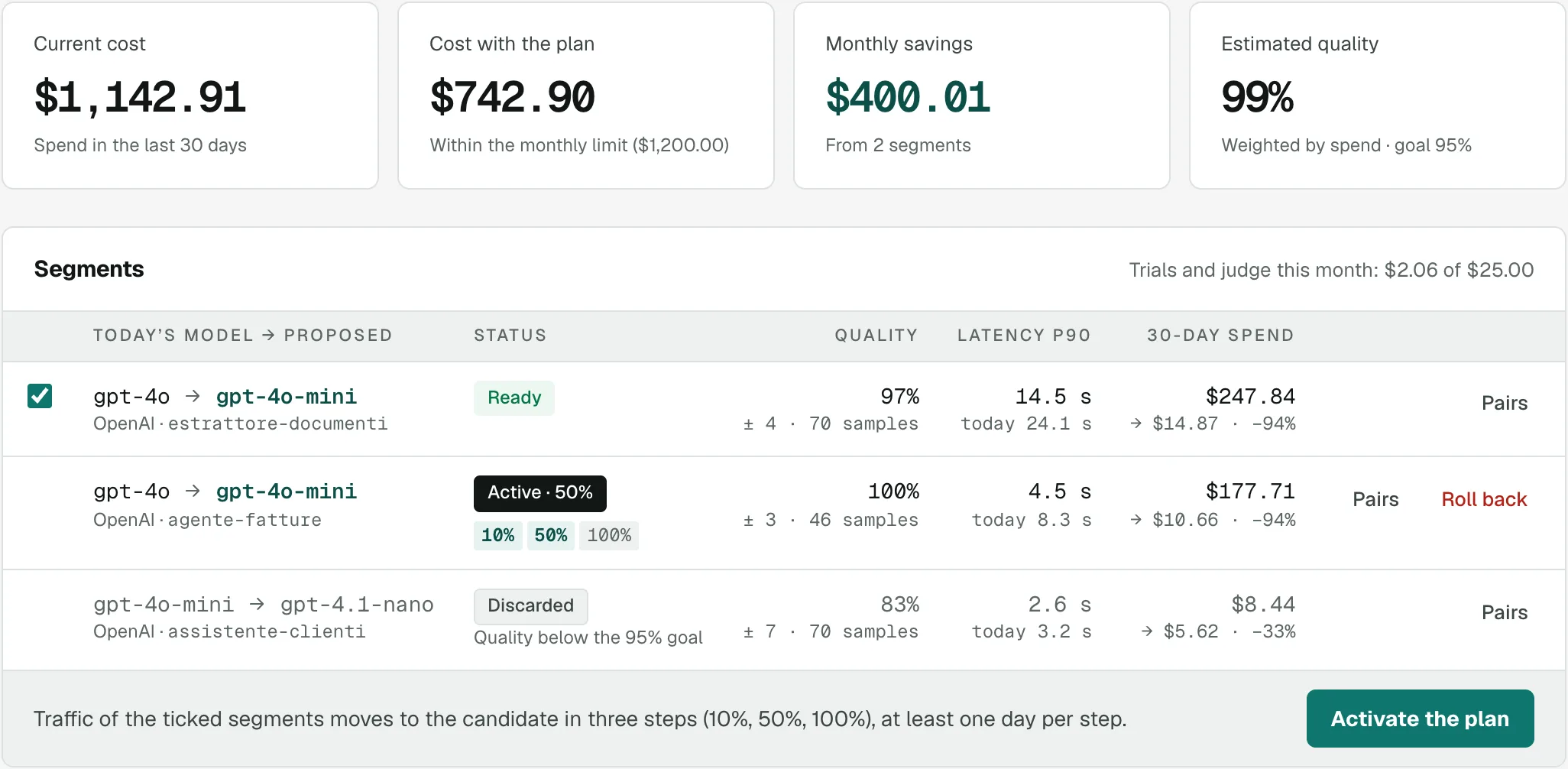
- Quality “equivalent to today’s”, with a margin and the number of samples: never a bare number.
- Trials and the judge use your keys, within a monthly spend cap you choose.
- Nothing moves without your approval, unless you choose to let it act on its own.
Comparisons or Autopilot?
The same mechanism: real calls repeated as a sample on another model. With Comparisons you decide; with Autopilot it decides and acts, within your goals.
| Aspect | Comparisons | Autopilot |
|---|---|---|
| Who starts it | You: pick model, candidate, agent, percentage and duration | It does: finds the agents and models that spend enough and picks the candidate |
| How many at once | One at a time, the one you create | Up to 10 together, plus the new ones it finds every day |
| Free-text quality | Word similarity (a hint) and your votes by hand | Automatic judge (today’s model); your votes override and check it |
| JSON answer quality | Average field-by-field agreement | Same comparison: a pair passes only if every field matches |
| Decision | Yours: you read the report and decide | Its own: quality with a margin, latency and savings against your goals, then it proposes a plan |
| Model switch | “Create the rule”: all traffic moves at once | You approve the plan: traffic moves to 10%, then 50%, then 100% |
| After the switch | No checks: the comparison is over | Ongoing monitoring: if quality drops it rolls back by itself and lets you know |
| Trial spend | A cap per comparison (candidate only) | A monthly cap for trials and judge, across the project |
| Duration | 1 to 30 days | Analysis up to 7 days, then monitoring while the switch is active |
| Stored texts | Encrypted, deleted 30 days after the comparison ends | Encrypted, deleted pair by pair after 30 days |
Personal data stays with you
Emails, phone numbers, IBANs, tax codes and names become placeholders before the call leaves. The provider works on the placeholders, the reply gets the real data back: your agent sees no difference.
Tell John Smith (john.smith@example.com, +44 7700 900123) that the refund goes to IBAN GB82 WEST 1234 5698 7654 32.
Tell [NAME_4KD2] ([EMAIL_7Q2X], [PHONE_2B8M]) that the refund goes to IBAN [IBAN_9F3A].
In the model’s reply the placeholders turn back into the real data, streaming included.
- Mask the data and put it back in the reply, or block the call before it costs anything. You choose per project.
- Detects emails, phone numbers, IBANs, Italian tax codes, VAT numbers, cards, IP addresses, ID documents and names, with validity checks: dates and amounts stay as they are.
- It is pseudonymisation, not anonymisation: the rest of the text reaches the provider. It lowers the risk, it doesn’t remove it.
Fewer tokens, less energy
Every loop stopped and every call moved to a lighter model is energy the datacenters don’t use. GuardrailX estimates it for you in kWh, CO₂e and water.
Where it comes from
Loops stopped, lighter models picked by rules and Autopilot, reasoning cut. Everything GuardrailX saves you in tokens, in energy.
Honest estimates
It starts from the tokens of each call and the model’s size class. Every number has its range, and the public methodology has a version number.
Ready for reporting
Export energy, CO₂e and water to CSV by day, agent and source: the numbers you need for ESG reports and Scope 3, yours and your customers’.
Control first, then savings
First you stop the spending you don’t want. Then the data shows you where to spend less without losing quality.
See where the money goes, day by day
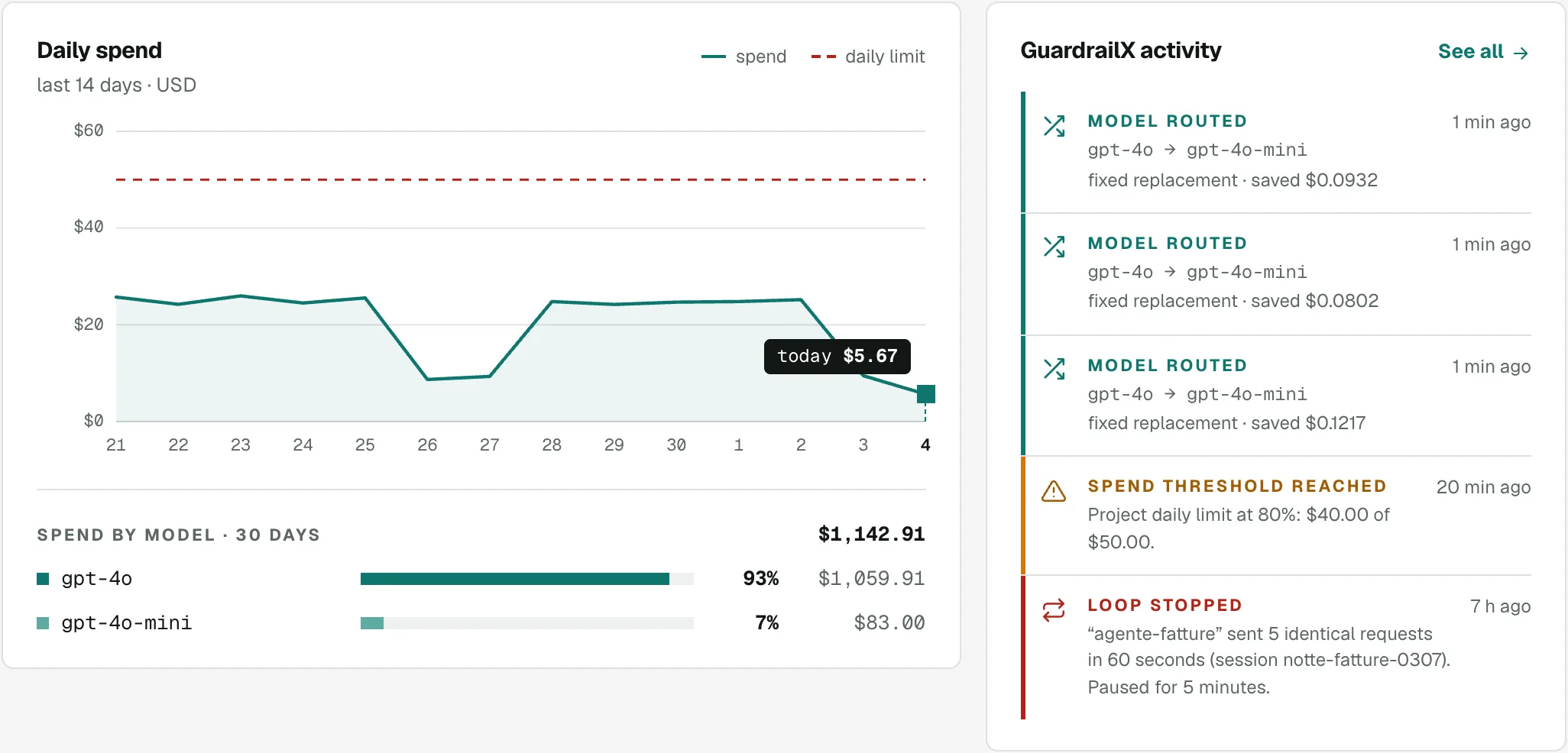
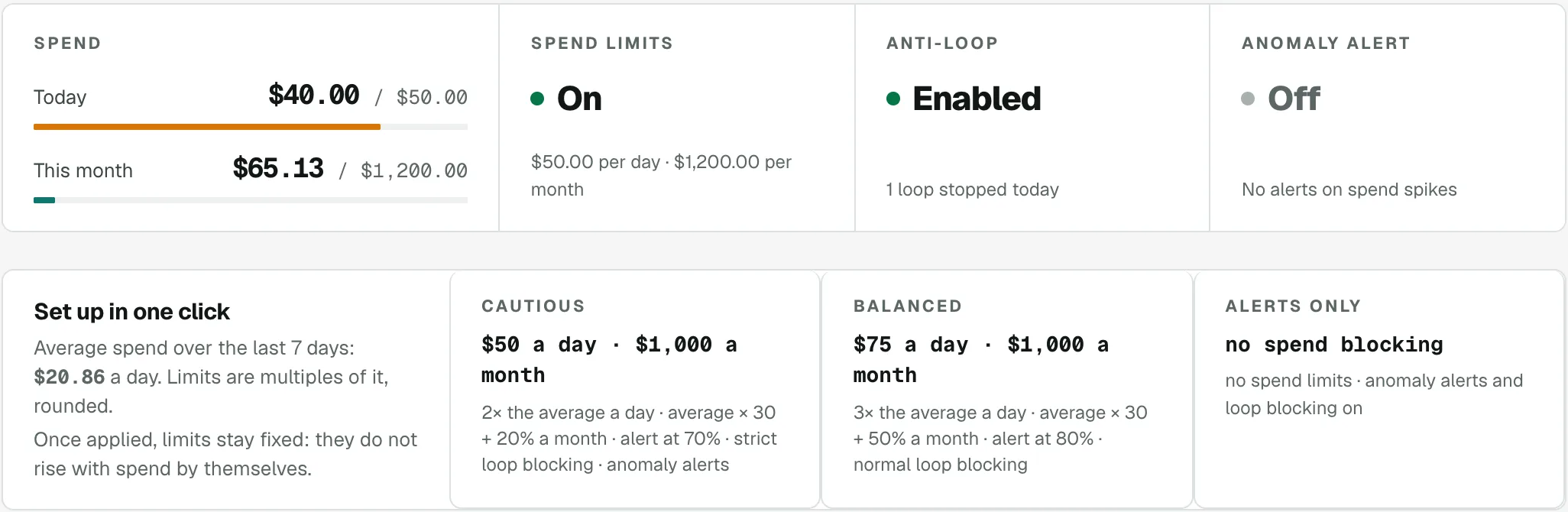
Daily spend against your limit, the models that cost the most and everything GuardrailX did: thresholds reached, models routed, loops stopped.
A spending cap at every level
Daily and monthly limits per project, key, agent and session, with an alert as you get close. Past the limit, the call stops before it costs anything.
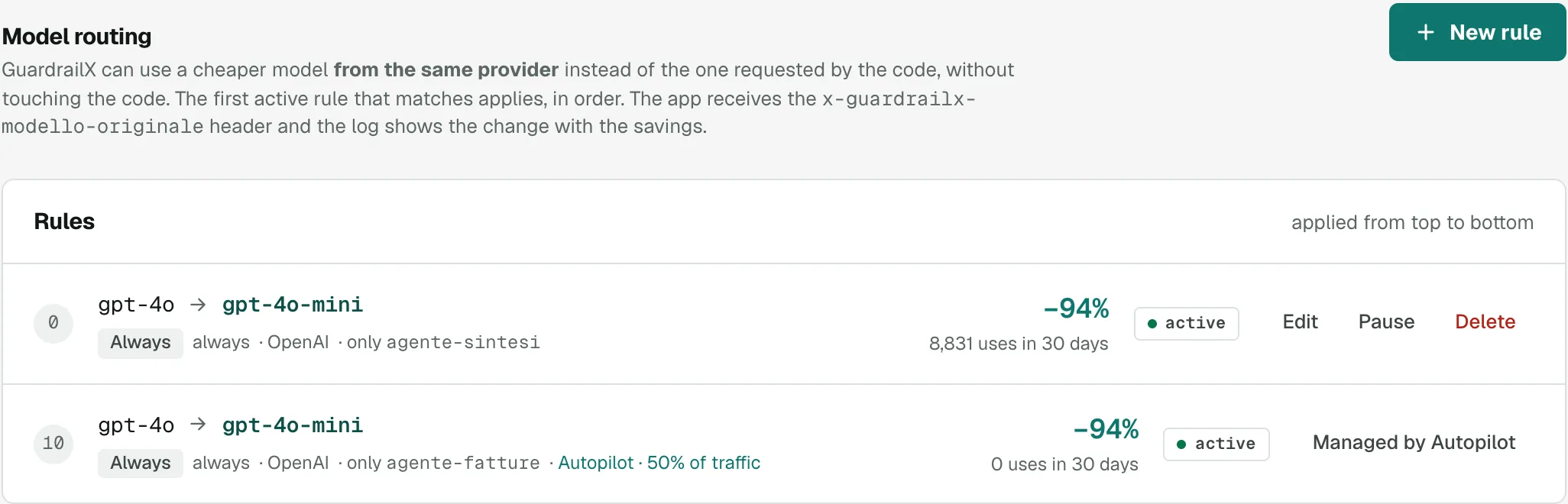
The cheaper model, where it is enough
A rule sends to gpt-4o-mini the work that does not need gpt-4o, without touching the code. Next to it you see how often it fired and how much you saved.
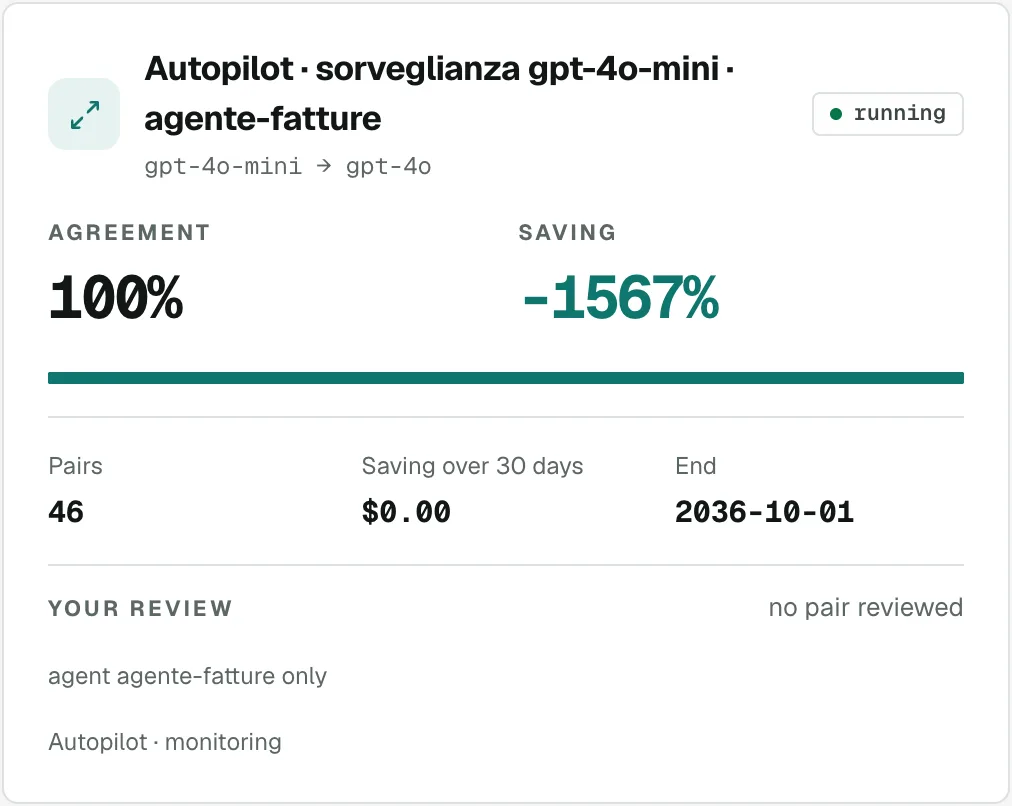
Before switching models, test it on your data
A sample of your real calls is replayed on the candidate model: you see how similar the answers are and how much you would save, then you decide.
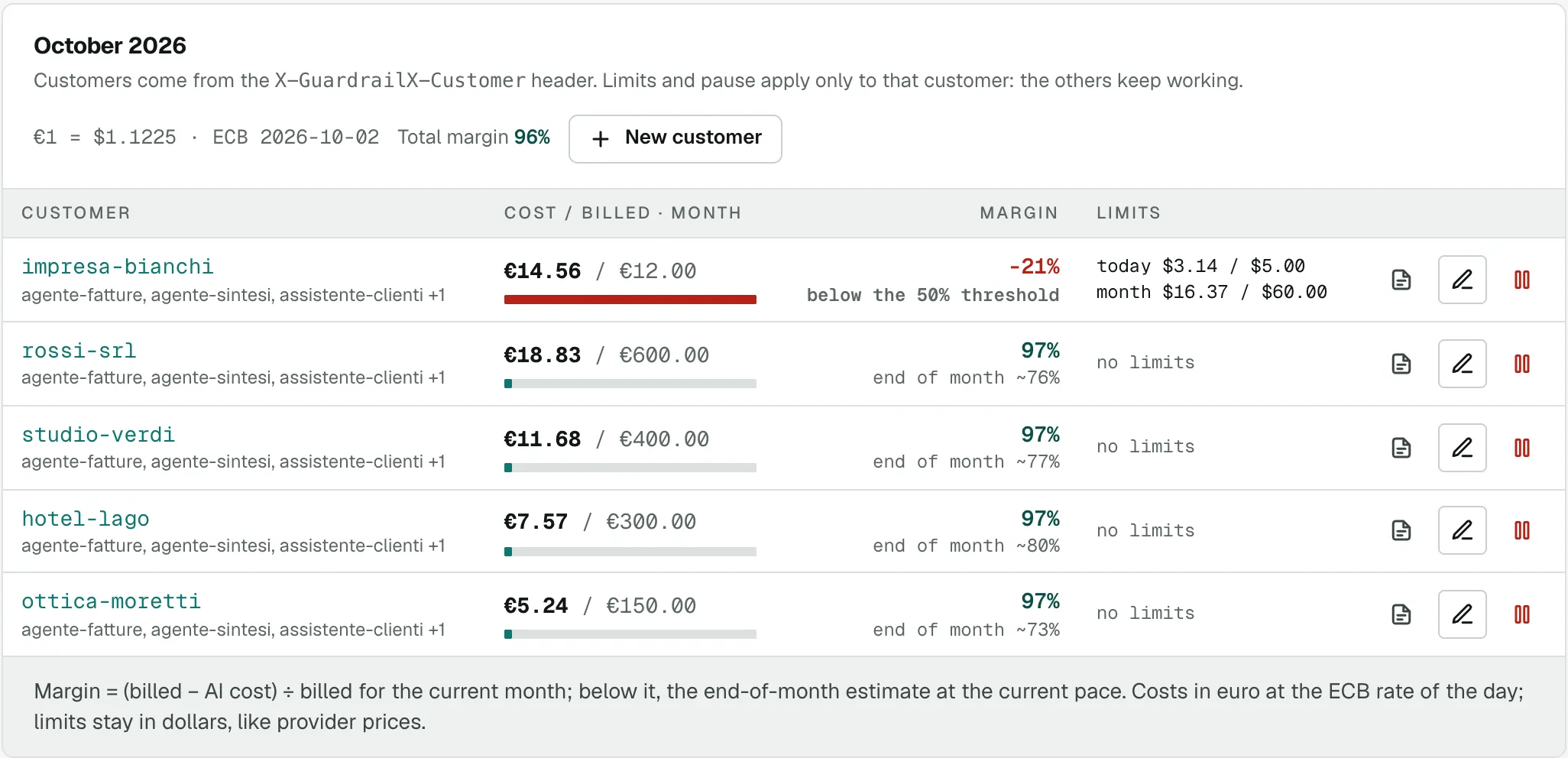
Cost and margin of every client
What each client costs you, what you bill them and the margin in euros. If a client goes overboard you stop just that one, the others keep going.
And more
Autopilot
Tries cheaper models on your calls by itself, measures quality and moves traffic a little at a time, rolling back if needed.
Learn more →Privacy Guard
Masks emails, phone numbers, IBANs, tax codes and names before the provider and puts them back in the reply. Or blocks the call.
Learn more →Environmental impact
Energy, CO₂e and water saved by stopped loops and lighter models, estimated from tokens, with CSV export for ESG reports.
Learn more →Spend limits at every level
Per project, key, agent and session, daily and monthly. Once the limit is reached, the call stops before it costs anything.
Learn more →Loop blocking
Spots the same request repeated within seconds and blocks it, with a clear error your code can handle.
Learn more →Anomaly alerts and pause
When last hour’s spend is out of the ordinary you get an alert, with a link to pause the project or the agent.
Learn more →Model routing
Rules per model and per agent: send work that doesn’t need the most expensive model to a cheaper one, with automatic fallback.
Learn more →Allowed models
Choose which models your agents can use: a call to a model that isn’t allowed stops before it costs anything, or goes to the default model.
Learn more →Model comparisons
On a sample of real calls, compare the answers of two models side by side and decide with your data, not benchmarks.
Learn more →Savings suggestions
Points out replaceable models, reasoning you can limit, retired models and budgets at risk of overrun, with an estimate of what you would save and a way to try it.
Learn more →Request settings check
Looks at how you call the model and flags what makes you spend more: unlimited reasoning on an extraction, a temperature that makes answers longer, instructions that miss the cache. Without storing your prompts.
Learn more →A log of every call
Cost, tokens (reasoning tokens too), model, agent, session, retries. Filters, charts and CSV export.
Learn more →Collaborators
Invite colleagues or clients to a project, read-only or with edit rights, and see who changed what.
Webhooks and alerts
Email or webhook when a limit is close, exceeded, or a loop is blocked.
Learn more →Spend per end customer
With one more header you see what each of your customers costs you, filter their calls and give them spend limits or pause them, without stopping the others.
Learn more →Margin per customer
Enter what you bill each customer: see the month’s margin in euro, at the day’s ECB rate, and get an alert if it drops below your threshold.
Learn more →Reports to send to customers
A monthly report per customer with costs, calls, agents and models, with your agency’s name and logo: print it or save it as PDF.
Learn more →Pay for control, not for tokens
You pay model costs to the provider, with your own key. Prices exclude VAT.
Free
To try GuardrailX on one agent
No card, no end date
- 5,000 requests a month
- 1 project
- Spend limits and loop blocking
- Autopilot: automatic cost reduction
- Privacy Guard: sensitive data masked
- Estimated environmental impact, with CSV export
- Routing and model comparisons
- Webhooks and CSV export
- Spend per end customer
- No collaborators
- 90-day request history
No credit card required
Base
Most popularFor teams with agents in production
- 250,000 requests a month
- Up to 5 projects
- Spend limits and loop blocking
- Autopilot: automatic cost reduction
- Privacy Guard: sensitive data masked
- Estimated environmental impact, with CSV export
- Routing and model comparisons
- Webhooks and CSV export
- Spend per end customer
- 3 collaborators per project
- 90-day request history
No credit card required
Agency
For those running agents for clients →
- 1,000,000 requests a month
- Unlimited projects
- Spend limits and loop blocking
- Autopilot: automatic cost reduction
- Privacy Guard: sensitive data masked
- Estimated environmental impact, with CSV export
- Routing and model comparisons
- Webhooks and CSV export
- Spend per end customer
- Unlimited collaborators
- 365-day request history
- Limits and pause per end customer
- Margin per customer in euros
- Monthly report for each customer
No credit card required
Enterprise
On your servers, for those whose prompts cannot leave
Priced on installation and volume
- Every Agency feature
- Installed on your servers
- Prompts and responses never leave your network
- Annual contract and dedicated support
Beyond the included requests, Base and Agency keep working: €5 per 100,000 extra requests.
Everything you want to know
How GuardrailX works, what happens to your data and how payments work.
GuardrailX features
How do I connect my agents?
You change two things in your code: the provider’s base URL becomes GuardrailX’s, and instead of the provider key you use a GuardrailX key (gr_…). It works with the official SDKs and with direct HTTP calls, streaming included; the Integration tab shows ready-to-copy code.
Which providers and models are supported?
OpenAI, Anthropic, Google Gemini, Mistral AI, DeepSeek and OpenRouter, with all their models. Model prices update automatically, so each call is priced on the current price list.
What happens when a limit is exceeded?
The call stops before it starts, so it costs nothing. Your agent gets a 429 error in the provider’s format, with a code saying which limit was hit (for example project_daily_limit), and you get an alert by email, webhook, Slack, Discord or Telegram.
Can I stop agents from using certain models?
Yes: in the Allowed models tab you choose the models the project’s agents can use. A call to any other model is, as you prefer, blocked with the model_not_allowed error at no cost, or sent to its provider’s default model. The check also applies after routing rules.
How does it detect a loop?
If the same request arrives several times in a row (by default 5 times in 60 seconds), GuardrailX blocks the repeats for a few minutes with a clear error (loop_detected) your code can handle. Number of repeats, time window and pause length are set per project.
Can I see spend per agent, session or customer?
Yes: add the X-GuardrailX-Agent, X-GuardrailX-Session or X-GuardrailX-Customer headers to your calls. You can see spend and set limits on each; with the Agency plan you also get margin and a monthly report per end customer.
Can Autopilot make my agents’ answers worse?
It moves a segment only if, on at least 50 samples, the cheaper model’s answers are acceptable in place of today’s as often as you ask. Then it starts at 10% of traffic and keeps checking: if quality drops it goes back to the previous model by itself. The judge rates equivalence with today’s answers, not truth: you can leave critical agents out.
How much does model reasoning cost me?
Models that reason (such as Gemini, OpenAI’s reasoning models and many on OpenRouter) bill reasoning tokens as output, even though you don’t see them. GuardrailX counts them separately for every call. If an agent pays a lot of them with no limit, it suggests so with the estimated saving, the parameter to add in your code and a way to measure the difference on your own calls.
How do you calculate the environmental impact?
From the tokens of each call, with an energy per model class (mini, small, medium, large) within the orders of magnitude published by Google, Epoch AI and EcoLogits. CO₂e uses the average grid intensity, water the datacenter cooling. They are estimates, with the range in view: the full methodology is in the dashboard.
How much latency does it add?
GuardrailX adds one network hop and the limit checks: little compared with the seconds a model takes to answer. Streaming responses arrive as they are generated, just like from the provider.
What if GuardrailX is down?
You can make your code fall back to the provider directly when GuardrailX doesn’t answer: the Integration tab shows how. Your agents never stop because of us.
Security and data
Do you store my prompts?
No. For each call we record only costs, tokens and metadata. The only exceptions are Comparisons and Autopilot, if you turn them on: the sampled texts are encrypted and deleted after 30 days. And with Privacy Guard, sensitive data doesn’t even reach the provider.
Can I keep personal data from reaching the provider?
Yes, with Privacy Guard, in the project’s Limits tab. Emails, phone numbers, IBANs, tax codes, VAT numbers, cards, IP addresses, ID documents and names become placeholders like [EMAIL_7Q2X] before the call leaves, and turn back into the real data in the reply. Alternatively, a call with sensitive data is blocked (sensitive_data_detected error) and costs nothing.
Does the provider still see the rest of the text?
Yes: Privacy Guard removes the data it recognises, not the content of the request. It is pseudonymisation, not anonymisation. The mapping between placeholders and real data stays encrypted in the proxy’s memory, and the request log shows how many values were masked, never the values.
What happens to my provider keys?
They are stored encrypted (AES-256-GCM) and used only for your agents’ calls. The Requests tab shows every call made on your behalf.
How do you protect GuardrailX keys?
A gr_ key is shown only once, when you create it: we keep only its fingerprint, never the key itself. You can disable it or create a new one at any time, and set spending limits on each.
How is my account protected?
Passwords are stored only as a fingerprint (bcrypt) and repeated login attempts are slowed down. You can turn on two-step verification with an authenticator app and recovery codes, or sign in with Google.
Where is the data stored?
On servers in Italy. Off-site backups are encrypted, and connections to the dashboard and the proxy always use HTTPS.
Who processes my data?
WebbergatePlus+ s.r.l., an Italian company, under the GDPR. The data processing agreement (DPA) is part of the Terms of service.
Can I delete my account and my data?
Yes, at any time from the Account page. The subscription ends and your data is deleted within 30 days; it disappears from backups within 60. We keep only what the law requires, such as invoices.
Payments with Stripe
Do I need a card to get started?
No. The Free plan is free with no end date: Base features on one project, up to 5,000 requests a month. At the cap calls stop until the following month; for more requests, more projects or collaborators move to Base or Agency whenever you like.
How do I pay?
With Stripe, on its secure payment page. Only Stripe sees your card details, we never do. If you have a promotion code, you enter it there.
Do I get an invoice? What about VAT?
Yes. Prices exclude VAT, which is calculated at checkout based on your country; you can add your VAT number when paying. Invoices, card and billing details are under “Manage payments and invoices” on the Plan page.
Is the yearly plan worth it?
It costs the same as 10 months: 2 months are free. Included requests cover the whole year (12 times the monthly amount), so a busy month is balanced by a quieter one.
What if I go over the included requests?
Your agents don’t stop: extra requests are billed by usage, €5 per 100,000, prorated at the end of the period. On the Free plan, instead, calls stop at the cap.
Can I change plan?
Yes, and it applies immediately, including between monthly and yearly. Stripe calculates the difference for the remaining days: it charges it right away if the new plan costs more, or credits it to your next invoices if it costs less.
How do I cancel?
Whenever you like, from “Manage payments and invoices”. The plan stays active until the end of the period you’ve paid for and then doesn’t renew; there are no refunds for partial periods.
What happens if a payment fails?
Stripe retries the charge over the following days and your plan stays active meanwhile: just update your card. If every attempt fails the subscription ends and calls stop, but your data stays and you can reactivate a plan whenever you want.
Put a cap on spending before the next loop.
Start on the Free plan: 5,000 requests a month, no card and no end date.